Simulation Nodes are Fully Supported on Renderjuice and should work fairly intuitively out of the box.
The biggest thing to check is that you’ve cached and uploaded the cache.
Below we’ve linked to a very basic example .blend file downloads with the proper setup to try to replicate. Read on for more detailed instructions and tips!
To use simulation nodes with Renderjuice and likely other render farms, at a high level you mostly just need to bake and upload the cache:
1
Bake and Cache your simulation nodes
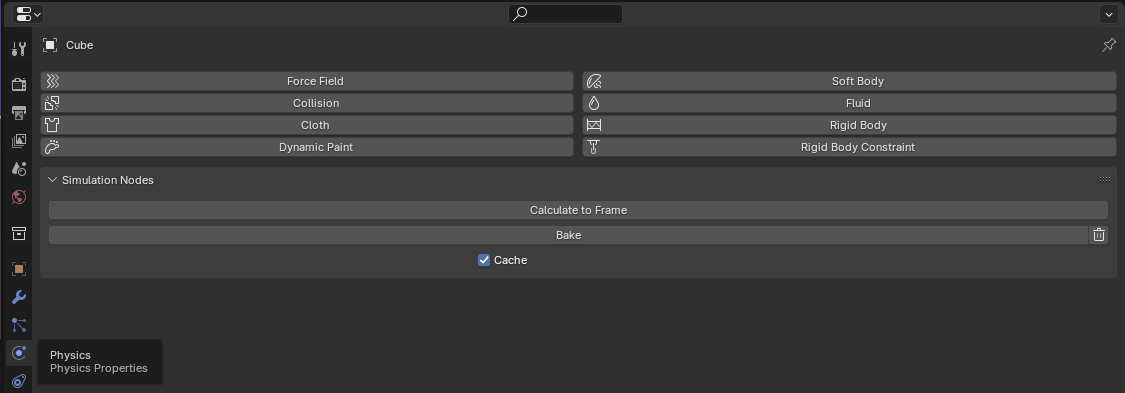
Ensure each object inside your Blender scene that utilizes simulation nodes are baked and cached. This can be found under Physics > Simulation Nodes > Bake
Baking menu for simulation nodes under Physics > Simulation Nodes
2
Ensure the cache path
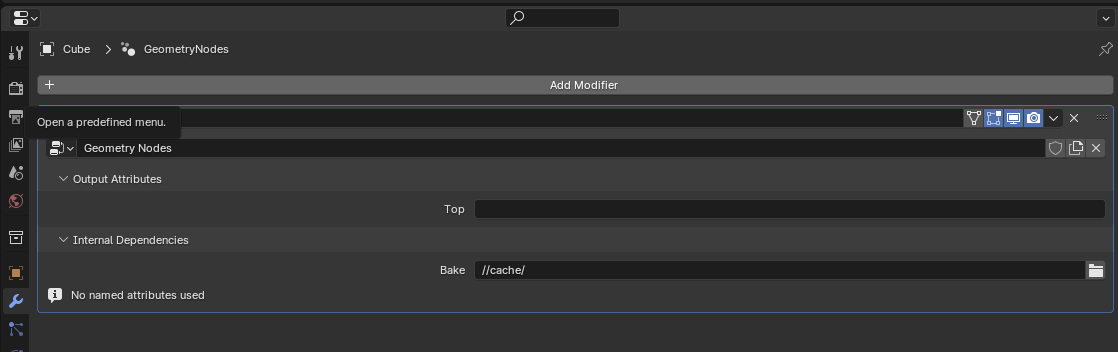
Ensure the path to where the cached simulation is located is where you expect it. This should be inside the folder you’ll be zipping and uploading. With the object(s) that use simulation nodes selected, you can edit or set this path under Modifiers > Internal Dependencies > Bake
By default, this will be set correctly for most scenarios.
Setting the cache path for simulation nodes under Modifiers > Internal Dependencies > Bake
3
Save after rebaking!
Make sure you’re saving your .blend after you’ve made any changes or re-baked, because baking will change dependencies within your .blend file
4
Zip and upload your scene
Zip your assets and upload your scene with the simulation cache on Renderjuice. Blend Project Packer can help collect detected project dependencies and baked cache folders into a portable project zip.
Can I pack my simulation cache into my single blend file?
No, Blender does not support packing simulation caches into a single file see Blender docs on Packed Data. See: You must use a .zip with Renderjuice to use simulation nodes.
Which nodes in Blender does this actually correspond to?
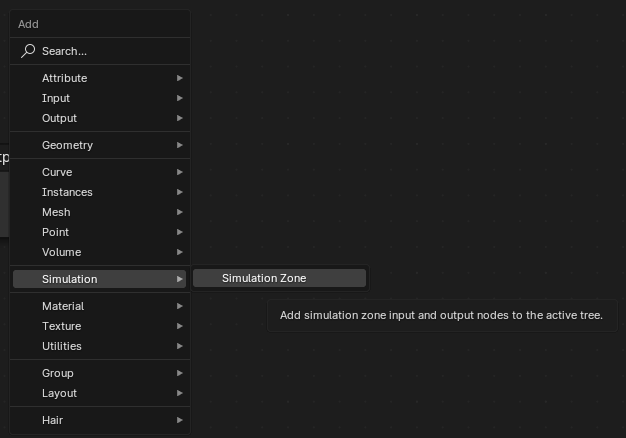
Simulation nodes as a category can be a bit confusing. But the nodes we’re referring to here are all found under the “Simulation” category in the “Add” menu of Geometry Nodes such as Simulation Zones.
Simulation nodes in Geometry Nodes under Add > Simulation
These will correspond to Simulation Input and Simulation Output nodes. All other geometry nodes, to our knowledge, will work out of the box.
Can Renderjuice support multiple simulations?
Yes! The same instructions as above apply, but must be individually applied to each simulation.
Was this page helpful?
⌘I
{"docsConfig":{"theme":"almond","$schema":"https://mintlify.com/docs.json","name":"Docs • Renderjuice","description":"Renderjuice documentation, product updates, and operational guidance.","colors":{"primary":"#7B61FF","light":"#7B61FF","dark":"#7B61FF"},"logo":{"light":"https://mintcdn.com/renderjuice/LAVdNoNpZYyOHLg8/images/logotype-light.png?fit=max\u0026auto=format\u0026n=LAVdNoNpZYyOHLg8\u0026q=85\u0026s=d96dd065bc30d371ab145237168161dc","dark":"https://mintcdn.com/renderjuice/LAVdNoNpZYyOHLg8/images/logotype-dark.png?fit=max\u0026auto=format\u0026n=LAVdNoNpZYyOHLg8\u0026q=85\u0026s=96c7be761c87b446289f126ba3cb7ff6","href":"https://www.renderjuice.com"},"favicon":"https://mintcdn.com/renderjuice/BXhaIkaEEfS2PUcP/favicon.png?fit=max\u0026auto=format\u0026n=BXhaIkaEEfS2PUcP\u0026q=85\u0026s=607c7e08723ead417df2bfda4faf51b1","api":{"playground":{"display":"interactive"},"examples":{"defaults":"required","languages":["curl","python","javascript"],"prefill":true}},"navbar":{"links":[],"primary":{"type":"button","label":"Go to App","href":"https://www.app.renderjuice.com"}},"seo":{"indexing":"navigable"},"fonts":{"heading":{"family":"Founders Grotesk","weight":500,"source":"fonts/founders-grotesk-medium.woff2","format":"woff2"},"body":{"family":"Founders Grotesk","weight":400,"source":"fonts/founders-grotesk-regular.woff2","format":"woff2"}},"integrations":{"intercom":{"appId":"ghbyvsdg"}},"contextual":{"options":["copy","chatgpt","claude","cursor","vscode"],"display":"header"},"styling":{"latex":false},"navigation":{"global":{"anchors":[{"anchor":"Roadmap","icon":"map","href":"https://www.feedback.renderjuice.com"},{"anchor":"Trust Center","icon":"shield-check","href":"https://trust.renderjuice.com"},{"anchor":"Status","icon":"signal-bars","href":"https://status.renderjuice.com"},{"anchor":"API Reference","icon":"square-terminal","href":"/api/introduction"},{"anchor":"Webhook Reference","icon":"webhook","href":"/api/webhooks/events"}]},"pages":[]}},"deployment":{"deploymentMetadataValue":{"subdomain":"renderjuice","hasAudioNarration":false,"actualSubdomain":"renderjuice","customDomains":["www.renderjuice.com"],"gitSource":{"type":"github","owner":"shylabs","repo":"juice","deployBranch":"main","contentDirectory":"apps/docs","isPrivate":false,"mountPath":"","label":""},"chroma":{"liveDeploymentHistoryId":"6adf32ba16765f5140a08061","collectionId":"aef04b41-d4ac-4375-b2d2-0c59c8f342ae","schemaVersion":"v3","latestBuiltDeploymentHistoryId":"6adf32ba16765f5140a08061"},"feedback":{"thumbs":true},"entitlements":{"AI_CHAT":{"status":"ENABLED"},"WEB_MCP":{"status":"ENABLED"},"NARRATION":{"status":"ENABLED"}},"buildId":"6adf32ba16765f5140a08061","clientVersion":"0.0.3971","searchFilterCounts":[{"language":"default","tag":"Documentation","count":25},{"language":"default","tag":"API Reference","count":13},{"language":"default","tag":"Endpoint Reference","count":10},{"language":"default","tag":"Jobs","count":9},{"language":"default","tag":"Rendering with Blender","count":8},{"language":"default","tag":"Renderjuice 101","count":6},{"language":"default","tag":"Platform","count":5},{"language":"default","tag":"Customizing Pipelines","count":3},{"language":"default","tag":"Letters to our Users","count":3},{"language":"default","tag":"Letters","count":3}]},"assistantConfig":{"enableStarterQuestions":true},"basePath":"/docs","hasChatPermissions":true,"hasWebMcpPermissions":true,"toggles":[{"name":"kill-isr","enabled":true,"variant":{"name":"disabled","enabled":false,"feature_enabled":true},"impressionData":false},{"name":"agent-mintlify-slack","enabled":true,"variant":{"name":"disabled","enabled":false,"feature_enabled":true},"impressionData":false},{"name":"editor-v7-file-tree","enabled":true,"variant":{"name":"disabled","enabled":false,"feature_enabled":true},"impressionData":false},{"name":"agent-integrations-settings","enabled":true,"variant":{"name":"disabled","enabled":false,"feature_enabled":true},"impressionData":false},{"name":"automations-pr-grouping","enabled":true,"variant":{"name":"disabled","enabled":false,"feature_enabled":true},"impressionData":false},{"name":"custom-prefix","enabled":true,"variant":{"name":"disabled","enabled":false,"feature_enabled":true},"impressionData":false},{"name":"analytics-v7","enabled":true,"variant":{"name":"disabled","enabled":false,"feature_enabled":true},"impressionData":false},{"name":"user-flows-analytics","enabled":true,"variant":{"name":"disabled","enabled":false,"feature_enabled":true},"impressionData":false},{"name":"no-publish-flow","enabled":true,"variant":{"name":"disabled","enabled":false,"feature_enabled":true},"impressionData":false},{"name":"workos-onboarding","enabled":true,"variant":{"name":"disabled","enabled":false,"feature_enabled":true},"impressionData":false},{"name":"llms-txt-v2","enabled":true,"variant":{"name":"disabled","enabled":false,"feature_enabled":true},"impressionData":false},{"name":"pause-universal-search-reconcile","enabled":true,"variant":{"name":"disabled","enabled":false,"feature_enabled":true},"impressionData":false},{"name":"snapshot-serving-live","enabled":true,"variant":{"name":"disabled","enabled":false,"feature_enabled":true},"impressionData":false},{"name":"stripTemperatureMiddleware","enabled":true,"variant":{"name":"disabled","enabled":false,"feature_enabled":true},"impressionData":false},{"name":"per-site-search-delta","enabled":true,"variant":{"name":"disabled","enabled":false,"feature_enabled":true},"impressionData":false},{"name":"support-platform-pylon-zendesk","enabled":true,"variant":{"name":"disabled","enabled":false,"feature_enabled":true},"impressionData":false},{"name":"snapshot-serving","enabled":true,"variant":{"name":"disabled","enabled":false,"feature_enabled":true},"impressionData":false},{"name":"instant-rollback","enabled":true,"variant":{"name":"disabled","enabled":false,"feature_enabled":true},"impressionData":false},{"name":"granular-notifications-server","enabled":true,"variant":{"name":"disabled","enabled":false,"feature_enabled":true},"impressionData":false},{"name":"granular-notifications","enabled":true,"variant":{"name":"disabled","enabled":false,"feature_enabled":true},"impressionData":false},{"name":"editor-private-page-search","enabled":true,"variant":{"name":"disabled","enabled":false,"feature_enabled":true},"impressionData":false},{"name":"automations-fable","enabled":true,"variant":{"name":"disabled","enabled":false,"feature_enabled":true},"impressionData":false},{"name":"fixed-ai-action-pricing","enabled":true,"variant":{"name":"disabled","enabled":false,"feature_enabled":true},"impressionData":false},{"name":"automation-resolve-merge-conflict","enabled":true,"variant":{"name":"disabled","enabled":false,"feature_enabled":true},"impressionData":false},{"name":"scoped-publishing","enabled":true,"variant":{"name":"disabled","enabled":false,"feature_enabled":true},"impressionData":false},{"name":"mintql","enabled":true,"variant":{"name":"disabled","enabled":false,"feature_enabled":true},"impressionData":false},{"name":"page-level-analytics","enabled":true,"variant":{"name":"disabled","enabled":false,"feature_enabled":true},"impressionData":false},{"name":"editor-version-history-v2","enabled":true,"variant":{"name":"disabled","enabled":false,"feature_enabled":true},"impressionData":false},{"name":"editor-nav-generations","enabled":true,"variant":{"name":"disabled","enabled":false,"feature_enabled":true},"impressionData":false},{"name":"billing-page-v2","enabled":true,"variant":{"name":"disabled","enabled":false,"feature_enabled":true},"impressionData":false},{"name":"workspace-projects","enabled":true,"variant":{"name":"disabled","enabled":false,"feature_enabled":true},"impressionData":false},{"name":"assistant-v5","enabled":true,"variant":{"name":"disabled","enabled":false,"feature_enabled":true},"impressionData":false},{"name":"byok-sep-25","enabled":true,"variant":{"name":"disabled","enabled":false,"feature_enabled":true},"impressionData":false},{"name":"fork-pr-previews","enabled":true,"variant":{"name":"disabled","enabled":false,"feature_enabled":true},"impressionData":false},{"name":"revalidation-jwt","enabled":true,"variant":{"name":"disabled","enabled":false,"feature_enabled":true},"impressionData":false},{"name":"vite-origin","enabled":true,"variant":{"name":"disabled","enabled":false,"feature_enabled":true},"impressionData":false},{"name":"editor-agent-model-picker","enabled":true,"variant":{"name":"disabled","enabled":false,"feature_enabled":true},"impressionData":false},{"name":"billing-updated-9-15","enabled":true,"variant":{"name":"disabled","enabled":false,"feature_enabled":true},"impressionData":false},{"name":"workos-sso-scim","enabled":true,"variant":{"name":"disabled","enabled":false,"feature_enabled":true},"impressionData":false},{"name":"hobby-abuse-scan","enabled":true,"variant":{"name":"disabled","enabled":false,"feature_enabled":true},"impressionData":false},{"name":"dashboard-inbox","enabled":true,"variant":{"name":"disabled","enabled":false,"feature_enabled":true},"impressionData":false},{"name":"workos-signup","enabled":true,"variant":{"name":"disabled","enabled":false,"feature_enabled":true},"impressionData":false},{"name":"workos-enabled","enabled":true,"variant":{"name":"disabled","enabled":false,"feature_enabled":true},"impressionData":false}],"isAtlas":false,"googleFontsInlined":false},"customCss":[{"filePath":"style.css","content":"@font-face{font-family:'Founders Grotesk';font-style:normal;font-weight:400;src:url(/fonts/founders-grotesk-regular.woff2) format('woff2');font-display:swap}@font-face{font-family:'Founders Grotesk';src:url(/fonts/founders-grotesk-regular-italic.woff2) format('woff2');font-weight:400;font-style:italic}@font-face{font-family:'Founders Grotesk';src:url(/fonts/founders-grotesk-light.woff2) format('woff2');font-weight:300;font-style:normal}@font-face{font-family:'Founders Grotesk';src:url(/fonts/founders-grotesk-light-italic.woff2) format('woff2');font-weight:300;font-style:italic}@font-face{font-family:'Founders Grotesk';src:url(/fonts/founders-grotesk-regular.woff2) format('woff2');font-weight:400;font-style:normal}@font-face{font-family:'Founders Grotesk';src:url(/fonts/founders-grotesk-regular-italic.woff2) format('woff2');font-weight:400;font-style:italic}@font-face{font-family:'Founders Grotesk';src:url(/fonts/founders-grotesk-medium.woff2) format('woff2');font-weight:500;font-style:normal}@font-face{font-family:'Founders Grotesk';src:url(/fonts/founders-grotesk-medium-italic.woff2) format('woff2');font-weight:500;font-style:italic}@font-face{font-family:'Founders Grotesk';src:url(/fonts/founders-grotesk-semibold.woff2) format('woff2');font-weight:600;font-style:normal}@font-face{font-family:'Founders Grotesk';src:url(/fonts/founders-grotesk-semibold-italic.woff2) format('woff2');font-weight:600;font-style:italic}@font-face{font-family:'Founders Grotesk';src:url(/fonts/founders-grotesk-bold.woff2) format('woff2');font-weight:700;font-style:normal}@font-face{font-family:'Founders Grotesk';src:url(/fonts/founders-grotesk-bold-italic.woff2) format('woff2');font-weight:700;font-style:italic}@font-face{font-family:'Founders Grotesk Text';src:url(/fonts/TestFoundersGroteskText-Regular.otf) format('opentype');font-weight:400;font-style:normal}@font-face{font-family:'Founders Grotesk Text';src:url(/fonts/TestFoundersGroteskText-RegularItalic.otf) format('opentype');font-weight:400;font-style:italic}@font-face{font-family:'Founders Grotesk Text';src:url(/fonts/TestFoundersGroteskText-Light.otf) format('opentype');font-weight:300;font-style:normal}@font-face{font-family:'Founders Grotesk Text';src:url(/fonts/TestFoundersGroteskText-LightItalic.otf) format('opentype');font-weight:300;font-style:italic}@font-face{font-family:'Founders Grotesk Text';src:url(/fonts/TestFoundersGroteskText-Medium.otf) format('opentype');font-weight:500;font-style:normal}@font-face{font-family:'Founders Grotesk Text';src:url(/fonts/TestFoundersGroteskText-MediumItalic.otf) format('opentype');font-weight:500;font-style:italic}@font-face{font-family:'Founders Grotesk Text';src:url(/fonts/TestFoundersGroteskText-Semibold.otf) format('opentype');font-weight:600;font-style:normal}@font-face{font-family:'Founders Grotesk Text';src:url(/fonts/TestFoundersGroteskText-SemiboldItalic.otf) format('opentype');font-weight:600;font-style:italic}@font-face{font-family:'Founders Grotesk Text';src:url(/fonts/TestFoundersGroteskText-Bold.otf) format('opentype');font-weight:700;font-style:normal}@font-face{font-family:'Founders Grotesk Text';src:url(/fonts/TestFoundersGroteskText-BoldItalic.otf) format('opentype');font-weight:700;font-style:italic}@font-face{font-family:'Founders Grotesk Mono';src:url(/fonts/test-founders-grotesk-mono-regular.woff2) format('woff2');font-weight:400;font-style:normal}@font-face{font-family:'Founders Grotesk Mono';src:url(/fonts/test-founders-grotesk-mono-medium.woff2) format('woff2');font-weight:500;font-style:normal}@font-face{font-family:'Founders Grotesk Mono';src:url(/fonts/test-founders-grotesk-mono-semibold.woff2) format('woff2');font-weight:600;font-style:normal}@font-face{font-family:'Founders Grotesk Mono';src:url(/fonts/test-founders-grotesk-mono-bold.woff2) format('woff2');font-weight:700;font-style:normal}@font-face{font-family:'Founders Grotesk Mono';src:url(/fonts/test-founders-grotesk-mono-light.woff2) format('woff2');font-weight:300;font-style:normal}"}],"page":{"pagePath":"rendering-with-blender/simulation-nodes","slug":"/rendering-with-blender/simulation-nodes","pageMetadata":{"title":"Using Simulation Nodes with Render Farms","description":"Simulation nodes are fully supported on Renderjuice. Learn how to bake, cache, and upload your simulation data correctly.","href":"/rendering-with-blender/simulation-nodes"},"description":{"compiledSource":"\"use strict\";\nconst {jsx: _jsx} = arguments[0];\nconst {useMDXComponents: _provideComponents} = arguments[0];\nfunction _createMdxContent(props) {\n const _components = {\n p: \"p\",\n ..._provideComponents(),\n ...props.components\n };\n return _jsx(_components.p, {\n children: \"Simulation nodes are fully supported on Renderjuice. Learn how to bake, cache, and upload your simulation data correctly.\"\n });\n}\nfunction MDXContent(props = {}) {\n const {wrapper: MDXLayout} = {\n ..._provideComponents(),\n ...props.components\n };\n return MDXLayout ? _jsx(MDXLayout, {\n ...props,\n children: _jsx(_createMdxContent, {\n ...props\n })\n }) : _createMdxContent(props);\n}\nreturn {\n default: MDXContent\n};\n","frontmatter":{},"scope":{}},"pageType":"default","mdx":{"mdxSource":{"compiledSource":"\"use strict\";const{Fragment:_Fragment,jsx:_jsx,jsxs:_jsxs}=arguments[0];const{useMDXComponents:_provideComponents}=arguments[0];function _createMdxContent(props){const _components={a:`a`,code:`code`,em:`em`,input:`input`,li:`li`,p:`p`,pre:`pre`,span:`span`,strong:`strong`,ul:`ul`,..._provideComponents(),...props.components},{Accordion,Card,CardGroup,CodeBlock,Frame,Heading,OptimizedImage,Step,Steps,Tip}=_components;if(!Accordion)_missingMdxReference(`Accordion`,true);if(!Card)_missingMdxReference(`Card`,true);if(!CardGroup)_missingMdxReference(`CardGroup`,true);if(!CodeBlock)_missingMdxReference(`CodeBlock`,true);if(!Frame)_missingMdxReference(`Frame`,true);if(!Heading)_missingMdxReference(`Heading`,true);if(!OptimizedImage)_missingMdxReference(`OptimizedImage`,true);if(!Step)_missingMdxReference(`Step`,true);if(!Steps)_missingMdxReference(`Steps`,true);if(!Tip)_missingMdxReference(`Tip`,true);return _jsxs(_Fragment,{children:[_jsx(Heading,{level:`2`,id:`status--fully-supported`,children:`Status: ✅\\xA0Fully Supported`}),`\n`,_jsx(_components.p,{children:`Simulation Nodes are Fully Supported on Renderjuice and should work fairly intuitively out of the box.\nThe biggest thing to check is that you’ve cached and uploaded the cache.`}),`\n`,_jsx(Heading,{level:`2`,id:`example-files`,children:`Example Files`}),`\n`,_jsxs(_components.p,{children:[`Below we’ve linked to a very basic example `,_jsx(_components.code,{children:`.blend`}),` file downloads with the proper setup to try to replicate. Read on for more detailed instructions and tips!`]}),`\n`,_jsxs(CardGroup,{cols:2,children:[_jsx(Card,{title:`Uncached Example Incorrect ❌`,icon:`download`,href:`https://public.storage.renderjuice.com/docs-example-files/simulation-nodes-no-cache.zip`,children:_jsxs(_components.p,{children:[`Uncached `,_jsx(_components.code,{children:`zip`}),` of scene with simulation nodes`]})}),_jsx(Card,{title:`Cached Example Correct ✅`,icon:`download`,href:`https://public.storage.renderjuice.com/docs-example-files/simulation-nodes-with-cache.zip`,children:_jsxs(_components.p,{children:[`Cached `,_jsx(_components.code,{children:`zip`}),` of scene with simulation nodes`]})})]}),`\n`,_jsx(Heading,{level:`2`,id:`instructions`,children:`Instructions`}),`\n`,_jsx(_components.p,{children:`To use simulation nodes with Renderjuice and likely other render farms, at a high level you mostly just need to bake and upload the cache:`}),`\n`,_jsxs(Steps,{children:[_jsxs(Step,{title:`Bake and Cache your simulation nodes`,children:[_jsxs(_components.p,{children:[`Ensure each object inside your Blender scene that utilizes simulation nodes are baked and cached. This can be found under `,_jsx(_components.code,{children:`Physics > Simulation Nodes > Bake`})]}),_jsx(Frame,{caption:`Baking menu for simulation nodes under Physics > Simulation Nodes`,children:_jsx(OptimizedImage,{src:`https://mintcdn.com/renderjuice/LAVdNoNpZYyOHLg8/images/simulation-nodes-baking.png?fit=max\u0026auto=format\u0026n=LAVdNoNpZYyOHLg8\u0026q=85\u0026s=f0bdfadf68d47586a79aa54f8781ea55`,\"data-og-width\":`1125`,width:`1125`,\"data-og-height\":`393`,height:`393`,\"data-path\":`images/simulation-nodes-baking.png`,\"data-optimize\":`true`,\"data-opv\":`3`,srcset:`https://mintcdn.com/renderjuice/LAVdNoNpZYyOHLg8/images/simulation-nodes-baking.png?w=280\u0026fit=max\u0026auto=format\u0026n=LAVdNoNpZYyOHLg8\u0026q=85\u0026s=155fe6e45347c58b5361d2a9aa76b1e6 280w, https://mintcdn.com/renderjuice/LAVdNoNpZYyOHLg8/images/simulation-nodes-baking.png?w=560\u0026fit=max\u0026auto=format\u0026n=LAVdNoNpZYyOHLg8\u0026q=85\u0026s=d8bfac2a0b44804f28ef59bca6df9919 560w, https://mintcdn.com/renderjuice/LAVdNoNpZYyOHLg8/images/simulation-nodes-baking.png?w=840\u0026fit=max\u0026auto=format\u0026n=LAVdNoNpZYyOHLg8\u0026q=85\u0026s=f13682afb007d3e5ec989a7e01b97436 840w, https://mintcdn.com/renderjuice/LAVdNoNpZYyOHLg8/images/simulation-nodes-baking.png?w=1100\u0026fit=max\u0026auto=format\u0026n=LAVdNoNpZYyOHLg8\u0026q=85\u0026s=9972a3259aafe450c90091f21346859a 1100w, https://mintcdn.com/renderjuice/LAVdNoNpZYyOHLg8/images/simulation-nodes-baking.png?w=1650\u0026fit=max\u0026auto=format\u0026n=LAVdNoNpZYyOHLg8\u0026q=85\u0026s=bd7ad5d3ccae9a7436487174b00cc4a6 1650w, https://mintcdn.com/renderjuice/LAVdNoNpZYyOHLg8/images/simulation-nodes-baking.png?w=2500\u0026fit=max\u0026auto=format\u0026n=LAVdNoNpZYyOHLg8\u0026q=85\u0026s=b09aa5a194bcc30c57783c42b077e9ff 2500w`})})]}),_jsxs(Step,{title:`Ensure the cache path`,children:[_jsxs(_components.p,{children:[`Ensure the path to where the cached simulation is located is where you expect it. This should be inside the folder you’ll be zipping and uploading. With the object(s) that use simulation nodes selected, you can edit or set this path under `,_jsx(_components.code,{children:`Modifiers > Internal Dependencies > Bake`}),`\nBy default, this will be set correctly for most scenarios.`]}),_jsx(Frame,{caption:`Setting the cache path for simulation nodes under Modifiers > Internal Dependencies > Bake`,children:_jsx(OptimizedImage,{src:`https://mintcdn.com/renderjuice/LAVdNoNpZYyOHLg8/images/simulation-nodes-cache-pathing.png?fit=max\u0026auto=format\u0026n=LAVdNoNpZYyOHLg8\u0026q=85\u0026s=37c3efa30cef43f6c6d6f4f2ec0e202a`,\"data-og-width\":`1118`,width:`1118`,\"data-og-height\":`352`,height:`352`,\"data-path\":`images/simulation-nodes-cache-pathing.png`,\"data-optimize\":`true`,\"data-opv\":`3`,srcset:`https://mintcdn.com/renderjuice/LAVdNoNpZYyOHLg8/images/simulation-nodes-cache-pathing.png?w=280\u0026fit=max\u0026auto=format\u0026n=LAVdNoNpZYyOHLg8\u0026q=85\u0026s=47b3537ae8a05ccfa86f21bb5e0bd9e2 280w, https://mintcdn.com/renderjuice/LAVdNoNpZYyOHLg8/images/simulation-nodes-cache-pathing.png?w=560\u0026fit=max\u0026auto=format\u0026n=LAVdNoNpZYyOHLg8\u0026q=85\u0026s=596206200458166e0a4419d2f269b566 560w, https://mintcdn.com/renderjuice/LAVdNoNpZYyOHLg8/images/simulation-nodes-cache-pathing.png?w=840\u0026fit=max\u0026auto=format\u0026n=LAVdNoNpZYyOHLg8\u0026q=85\u0026s=e78fec08168baa67dab3a7808b267637 840w, https://mintcdn.com/renderjuice/LAVdNoNpZYyOHLg8/images/simulation-nodes-cache-pathing.png?w=1100\u0026fit=max\u0026auto=format\u0026n=LAVdNoNpZYyOHLg8\u0026q=85\u0026s=0dd3238a7759aad2853f11ca80dee649 1100w, https://mintcdn.com/renderjuice/LAVdNoNpZYyOHLg8/images/simulation-nodes-cache-pathing.png?w=1650\u0026fit=max\u0026auto=format\u0026n=LAVdNoNpZYyOHLg8\u0026q=85\u0026s=8138a309ba933d962c5c34614b5781a9 1650w, https://mintcdn.com/renderjuice/LAVdNoNpZYyOHLg8/images/simulation-nodes-cache-pathing.png?w=2500\u0026fit=max\u0026auto=format\u0026n=LAVdNoNpZYyOHLg8\u0026q=85\u0026s=f8a300260f089c9ac569b161fc909f9a 2500w`})})]}),_jsx(Step,{title:`Save after rebaking!`,children:_jsxs(_components.p,{children:[`Make sure you’re saving your `,_jsx(_components.code,{children:`.blend`}),` after you’ve made any changes or re-baked, because baking will change dependencies within your `,_jsx(_components.code,{children:`.blend`}),` file`]})}),_jsx(Step,{title:`Zip and upload your scene`,children:_jsxs(_components.p,{children:[`Zip your assets and upload your scene with the simulation cache on Renderjuice. `,_jsx(_components.a,{href:`/renderjuice-101/blend-project-packer`,children:`Blend Project Packer`}),` can help collect detected project dependencies and baked cache folders into a portable project zip.`]})}),_jsx(Step,{title:`🎉 Render!`})]}),`\n`,_jsx(Heading,{level:`2`,id:`checklist`,children:`Checklist`}),`\n`,_jsxs(_components.ul,{className:`contains-task-list`,children:[`\n`,_jsxs(_components.li,{className:`task-list-item`,children:[_jsx(_components.input,{type:`checkbox`,checked:true,disabled:true}),` `,`This might seem obvious, but did you save `,_jsx(_components.strong,{children:`after`}),` you baked? Easy to miss!`]}),`\n`,_jsxs(_components.li,{className:`task-list-item`,children:[_jsx(_components.input,{type:`checkbox`,checked:true,disabled:true}),` `,`Is your cache actually inside your `,_jsx(_components.code,{children:`.zip`}),` ? It should contain a series of data files with the file extension `,_jsx(_components.code,{children:`.blob`}),` and `,_jsx(_components.code,{children:`.json`}),` .`]}),`\n`,_jsxs(_components.li,{className:`task-list-item`,children:[_jsx(_components.input,{type:`checkbox`,checked:true,disabled:true}),` `,`Did you set the cache path correctly to be relative?`]}),`\n`,_jsxs(_components.li,{className:`task-list-item`,children:[_jsx(_components.input,{type:`checkbox`,checked:true,disabled:true}),` `,`Your directory structure should somewhat look like this:`]}),`\n`]}),`\n`,_jsx(CodeBlock,{filename:``,numberOfLines:`23`,language:`markdown`,children:_jsx(_components.pre,{className:`shiki shiki-themes github-light-default dark-plus`,style:{backgroundColor:`#ffffff`,\"--shiki-dark-bg\":`#0B0C0E`,color:`#1f2328`,\"--shiki-dark\":`#D4D4D4`},language:`markdown`,children:_jsxs(_components.code,{language:`markdown`,numberOfLines:`23`,children:[_jsx(_components.span,{className:`line`,children:_jsx(_components.span,{style:{color:`#1F2328`,\"--shiki-dark\":`#D4D4D4`},children:`cache/`})}),`\n`,_jsx(_components.span,{className:`line`,children:_jsx(_components.span,{style:{color:`#1F2328`,\"--shiki-dark\":`#D4D4D4`},children:`|-- Cube_GeometryNodes/`})}),`\n`,_jsx(_components.span,{className:`line`,children:_jsx(_components.span,{style:{color:`#1F2328`,\"--shiki-dark\":`#D4D4D4`},children:`| |-- 1014180200/`})}),`\n`,_jsx(_components.span,{className:`line`,children:_jsx(_components.span,{style:{color:`#1F2328`,\"--shiki-dark\":`#D4D4D4`},children:`| | |-- blobs/`})}),`\n`,_jsx(_components.span,{className:`line`,children:_jsx(_components.span,{style:{color:`#1F2328`,\"--shiki-dark\":`#D4D4D4`},children:`| | | |-- 00001_0000.blob`})}),`\n`,_jsx(_components.span,{className:`line`,children:_jsx(_components.span,{style:{color:`#1F2328`,\"--shiki-dark\":`#D4D4D4`},children:`| | | |-- 00002_0000.blob`})}),`\n`,_jsx(_components.span,{className:`line`,children:_jsx(_components.span,{style:{color:`#1F2328`,\"--shiki-dark\":`#D4D4D4`},children:`| | | |-- ...`})}),`\n`,_jsx(_components.span,{className:`line`,children:_jsx(_components.span,{style:{color:`#1F2328`,\"--shiki-dark\":`#D4D4D4`},children:`| | |-- meta/`})}),`\n`,_jsx(_components.span,{className:`line`,children:_jsx(_components.span,{style:{color:`#1F2328`,\"--shiki-dark\":`#D4D4D4`},children:`| | |-- 00001_00000.json`})}),`\n`,_jsx(_components.span,{className:`line`,children:_jsx(_components.span,{style:{color:`#1F2328`,\"--shiki-dark\":`#D4D4D4`},children:`| | |-- 00002_0000.json`})}),`\n`,_jsx(_components.span,{className:`line`,children:_jsx(_components.span,{style:{color:`#1F2328`,\"--shiki-dark\":`#D4D4D4`},children:`| | |-- ...`})}),`\n`,_jsx(_components.span,{className:`line`,children:_jsx(_components.span,{style:{color:`#1F2328`,\"--shiki-dark\":`#D4D4D4`},children:`|-- Metaball_GeometryNodes/`})}),`\n`,_jsx(_components.span,{className:`line`,children:_jsx(_components.span,{style:{color:`#1F2328`,\"--shiki-dark\":`#D4D4D4`},children:`| |-- 102123200/`})}),`\n`,_jsx(_components.span,{className:`line`,children:_jsx(_components.span,{style:{color:`#1F2328`,\"--shiki-dark\":`#D4D4D4`},children:`| | |-- blobs/`})}),`\n`,_jsx(_components.span,{className:`line`,children:_jsx(_components.span,{style:{color:`#1F2328`,\"--shiki-dark\":`#D4D4D4`},children:`| | | |-- 00001_0000.blob`})}),`\n`,_jsx(_components.span,{className:`line`,children:_jsx(_components.span,{style:{color:`#1F2328`,\"--shiki-dark\":`#D4D4D4`},children:`| | | |-- 00002_0000.blob`})}),`\n`,_jsx(_components.span,{className:`line`,children:_jsx(_components.span,{style:{color:`#1F2328`,\"--shiki-dark\":`#D4D4D4`},children:`| | | |-- ...`})}),`\n`,_jsx(_components.span,{className:`line`}),`\n`,_jsx(_components.span,{className:`line`,children:_jsx(_components.span,{style:{color:`#1F2328`,\"--shiki-dark\":`#D4D4D4`},children:`| | |-- meta/`})}),`\n`,_jsx(_components.span,{className:`line`,children:_jsx(_components.span,{style:{color:`#1F2328`,\"--shiki-dark\":`#D4D4D4`},children:`| | |-- 00001_00000.json`})}),`\n`,_jsx(_components.span,{className:`line`,children:_jsx(_components.span,{style:{color:`#1F2328`,\"--shiki-dark\":`#D4D4D4`},children:`| | |-- 00002_0000.json`})}),`\n`,_jsx(_components.span,{className:`line`,children:_jsx(_components.span,{style:{color:`#1F2328`,\"--shiki-dark\":`#D4D4D4`},children:`| | |-- ...`})}),`\n`,_jsx(_components.span,{className:`line`,children:_jsx(_components.span,{style:{color:`#1F2328`,\"--shiki-dark\":`#D4D4D4`},children:`|-- your_scene.blend`})}),`\n`]})})}),`\n`,_jsx(Tip,{children:`Can’t figure it out or something confusing? Just chat with us, we’re happy to help and respond pretty quickly!`}),`\n`,_jsx(Heading,{level:`2`,id:`faq`,children:`FAQ`}),`\n`,_jsx(Accordion,{title:`Can I pack my simulation cache into my single blend file?`,id:`can-i-pack-my-simulation-cache-into-my-single-blend-file`,children:_jsxs(_components.p,{children:[`No, Blender does not support packing simulation caches into a single file see `,_jsx(_components.a,{href:`https://docs.blender.org/manual/en/4.2/files/blend/packed_data.html`,children:`Blender docs on Packed Data`}),`. See: You `,_jsx(_components.em,{children:`must`}),` use a `,_jsx(_components.code,{children:`.zip`}),` with Renderjuice to use simulation nodes.`]})}),`\n`,_jsxs(Accordion,{defaultOpen:true,title:`Which nodes in Blender does this actually correspond to?`,id:`which-nodes-in-blender-does-this-actually-correspond-to`,children:[_jsx(_components.p,{children:`Simulation nodes as a category can be a bit confusing. But the nodes we’re referring to here are all found under the “Simulation” category in the “Add” menu of Geometry Nodes such as Simulation Zones.`}),_jsx(Frame,{caption:`Simulation nodes in Geometry Nodes under Add > Simulation`,children:_jsx(OptimizedImage,{src:`https://mintcdn.com/renderjuice/LAVdNoNpZYyOHLg8/images/simulation-nodes-adding.png?fit=max\u0026auto=format\u0026n=LAVdNoNpZYyOHLg8\u0026q=85\u0026s=e3b3dd82932d9d8122d55f65ba42caab`,\"data-og-width\":`626`,width:`626`,\"data-og-height\":`438`,height:`438`,\"data-path\":`images/simulation-nodes-adding.png`,\"data-optimize\":`true`,\"data-opv\":`3`,srcset:`https://mintcdn.com/renderjuice/LAVdNoNpZYyOHLg8/images/simulation-nodes-adding.png?w=280\u0026fit=max\u0026auto=format\u0026n=LAVdNoNpZYyOHLg8\u0026q=85\u0026s=a6c4ccb8056a36c73b54b37fb2455e1f 280w, https://mintcdn.com/renderjuice/LAVdNoNpZYyOHLg8/images/simulation-nodes-adding.png?w=560\u0026fit=max\u0026auto=format\u0026n=LAVdNoNpZYyOHLg8\u0026q=85\u0026s=28ec40cda52c896ea17995fb47d2563f 560w, https://mintcdn.com/renderjuice/LAVdNoNpZYyOHLg8/images/simulation-nodes-adding.png?w=840\u0026fit=max\u0026auto=format\u0026n=LAVdNoNpZYyOHLg8\u0026q=85\u0026s=813be7c29133d43d4a8c61182306c1ce 840w, https://mintcdn.com/renderjuice/LAVdNoNpZYyOHLg8/images/simulation-nodes-adding.png?w=1100\u0026fit=max\u0026auto=format\u0026n=LAVdNoNpZYyOHLg8\u0026q=85\u0026s=94aac071ba3602e599142e1cd29918fc 1100w, https://mintcdn.com/renderjuice/LAVdNoNpZYyOHLg8/images/simulation-nodes-adding.png?w=1650\u0026fit=max\u0026auto=format\u0026n=LAVdNoNpZYyOHLg8\u0026q=85\u0026s=d0ee5ee22d7869bac289dc2aa3f056db 1650w, https://mintcdn.com/renderjuice/LAVdNoNpZYyOHLg8/images/simulation-nodes-adding.png?w=2500\u0026fit=max\u0026auto=format\u0026n=LAVdNoNpZYyOHLg8\u0026q=85\u0026s=2411f1ff1eb992e3b51c3d8b0741d3a1 2500w`})}),_jsx(_components.p,{children:`These will correspond to Simulation Input and Simulation Output nodes. All other geometry nodes, to our knowledge, will work out of the box.`})]}),`\n`,_jsx(Accordion,{title:`Can Renderjuice support multiple simulations?`,id:`can-renderjuice-support-multiple-simulations`,children:_jsx(_components.p,{children:`Yes! The same instructions as above apply, but must be individually applied to each simulation.`})})]})}function MDXContent(props={}){const{wrapper:MDXLayout}={..._provideComponents(),...props.components};return MDXLayout?_jsx(MDXLayout,{...props,children:_jsx(_createMdxContent,{...props})}):_createMdxContent(props)}return{default:MDXContent};function _missingMdxReference(id,component){throw new Error(`Expected `+(component?`component`:`object`)+\" `\"+id+\"` to be defined: you likely forgot to import, pass, or provide it.\")}","frontmatter":{},"scope":{"config":{},"pageMetadata":{"title":"Using Simulation Nodes with Render Farms","description":"Simulation nodes are fully supported on Renderjuice. Learn how to bake, cache, and upload your simulation data correctly.","href":"/rendering-with-blender/simulation-nodes"}}},"mdxSourceWithNoJs":null},"mdxExtracts":{"tableOfContents":[{"title":"Status: ✅ Fully Supported","slug":"status--fully-supported","depth":2,"children":[]},{"title":"Example Files","slug":"example-files","depth":2,"children":[]},{"title":"Instructions","slug":"instructions","depth":2,"children":[]},{"title":"Checklist","slug":"checklist","depth":2,"children":[]},{"title":"FAQ","slug":"faq","depth":2,"children":[]}],"codeExamples":{}},"jsLinks":[],"subdomain":"renderjuice","siteName":"Docs • Renderjuice","title":"Using Simulation Nodes with Render Farms - Docs • Renderjuice","relatedPagesConfig":{"enabled":true,"limit":6,"mode":"automatic"},"navMaps":{"firstHrefInVersion":{},"firstHrefInLanguage":{}},"lastModified":"2026-06-26T16:28:09.982Z","originalFileLocation":"rendering-with-blender/simulation-nodes.mdx"},"headHtml":"\u003cscript data-mint-head>(function(){var d=document.documentElement,p=null;if(!p){try{p=localStorage.getItem(\"isDarkMode\")}catch(e){}if(p==='true')p='dark';else if(p==='false')p='light';if(p!=='light'\u0026\u0026p!=='dark'\u0026\u0026p!=='system')p=\"system\"}var r=p==='system'?(matchMedia(\"(prefers-color-scheme: dark)\").matches?'dark':'light'):p;d.classList.remove(r==='dark'?'light':'dark');d.classList.add(r);d.setAttribute(\"data-theme-preference\",p)})();\u003c/script>\u003cmeta data-mint-head name=\"description\" content=\"Simulation nodes are fully supported on Renderjuice. Learn how to bake, cache, and upload your simulation data correctly.\">\u003cmeta data-mint-head name=\"application-name\" content=\"Docs • Renderjuice\">\u003cmeta data-mint-head name=\"generator\" content=\"Mintlify\">\u003clink data-mint-head rel=\"icon\" type=\"image/png\" sizes=\"192x192\" href=\"/docs/mintlify-assets/_mintlify/favicons/renderjuice/_UzOlDRyM0gi6zxv/_generated/favicon/android-chrome-192x192.png\" media=\"(prefers-color-scheme: light)\">\u003clink data-mint-head rel=\"apple-touch-icon\" type=\"image/png\" sizes=\"180x180\" href=\"/docs/mintlify-assets/_mintlify/favicons/renderjuice/_UzOlDRyM0gi6zxv/_generated/favicon/apple-touch-icon.png\">\u003clink data-mint-head rel=\"icon\" type=\"image/png\" sizes=\"16x16\" href=\"/docs/mintlify-assets/_mintlify/favicons/renderjuice/_UzOlDRyM0gi6zxv/_generated/favicon/favicon-16x16.png\" media=\"(prefers-color-scheme: light)\">\u003clink data-mint-head rel=\"icon\" type=\"image/png\" sizes=\"32x32\" href=\"/docs/mintlify-assets/_mintlify/favicons/renderjuice/_UzOlDRyM0gi6zxv/_generated/favicon/favicon-32x32.png\" media=\"(prefers-color-scheme: light)\">\u003clink data-mint-head rel=\"shortcut icon\" type=\"image/x-icon\" href=\"/docs/mintlify-assets/_mintlify/favicons/renderjuice/_UzOlDRyM0gi6zxv/_generated/favicon/favicon.ico\" media=\"(prefers-color-scheme: light)\">\u003clink data-mint-head rel=\"icon\" type=\"image/png\" sizes=\"192x192\" href=\"/docs/mintlify-assets/_mintlify/favicons/renderjuice/_UzOlDRyM0gi6zxv/_generated/favicon-dark/android-chrome-192x192.png\" media=\"(prefers-color-scheme: dark)\">\u003clink data-mint-head rel=\"icon\" type=\"image/png\" sizes=\"16x16\" href=\"/docs/mintlify-assets/_mintlify/favicons/renderjuice/_UzOlDRyM0gi6zxv/_generated/favicon-dark/favicon-16x16.png\" media=\"(prefers-color-scheme: dark)\">\u003clink data-mint-head rel=\"icon\" type=\"image/png\" sizes=\"32x32\" href=\"/docs/mintlify-assets/_mintlify/favicons/renderjuice/_UzOlDRyM0gi6zxv/_generated/favicon-dark/favicon-32x32.png\" media=\"(prefers-color-scheme: dark)\">\u003clink data-mint-head rel=\"shortcut icon\" type=\"image/x-icon\" href=\"/docs/mintlify-assets/_mintlify/favicons/renderjuice/_UzOlDRyM0gi6zxv/_generated/favicon-dark/favicon.ico\" media=\"(prefers-color-scheme: dark)\">\u003cmeta data-mint-head property=\"og:title\" content=\"Using Simulation Nodes with Render Farms - Docs • Renderjuice\">\u003cmeta data-mint-head property=\"og:description\" content=\"Simulation nodes are fully supported on Renderjuice. Learn how to bake, cache, and upload your simulation data correctly.\">\u003cmeta data-mint-head property=\"og:site_name\" content=\"Docs • Renderjuice\">\u003cmeta data-mint-head property=\"og:url\" content=\"https://www.renderjuice.com/docs/rendering-with-blender/simulation-nodes\">\u003cmeta data-mint-head property=\"og:type\" content=\"website\">\u003cmeta data-mint-head property=\"og:image\" content=\"https://renderjuice.mintlify.app/_mintlify/api/og/v2?division=Rendering+with+Blender\u0026amp;title=Using+Simulation+Nodes+with+Render+Farms\u0026amp;description=Simulation+nodes+are+fully+supported+on+Renderjuice.+Learn+how+to+bake%2C+cache%2C+and+upload+your+simulation+data+correctly.\u0026amp;theme=4be27fe6d7b28f5b47a3d772\u0026amp;signature=7d32303f7ee2bb0537075666002dc4bc0eef6f405905df7681260b45ff8a97ca\">\u003cmeta data-mint-head property=\"og:image:width\" content=\"1200\">\u003cmeta data-mint-head property=\"og:image:height\" content=\"630\">\u003cmeta data-mint-head name=\"twitter:card\" content=\"summary_large_image\">\u003cmeta data-mint-head name=\"twitter:title\" content=\"Using Simulation Nodes with Render Farms - Docs • Renderjuice\">\u003cmeta data-mint-head name=\"twitter:description\" content=\"Simulation nodes are fully supported on Renderjuice. Learn how to bake, cache, and upload your simulation data correctly.\">\u003cmeta data-mint-head name=\"twitter:image\" content=\"https://renderjuice.mintlify.app/_mintlify/api/og/v2?division=Rendering+with+Blender\u0026amp;title=Using+Simulation+Nodes+with+Render+Farms\u0026amp;description=Simulation+nodes+are+fully+supported+on+Renderjuice.+Learn+how+to+bake%2C+cache%2C+and+upload+your+simulation+data+correctly.\u0026amp;theme=4be27fe6d7b28f5b47a3d772\u0026amp;signature=7d32303f7ee2bb0537075666002dc4bc0eef6f405905df7681260b45ff8a97ca\">\u003cmeta data-mint-head name=\"twitter:image:width\" content=\"1200\">\u003cmeta data-mint-head name=\"twitter:image:height\" content=\"630\">\u003cmeta data-mint-head name=\"msapplication-config\" content=\"/docs/mintlify-assets/_mintlify/favicons/renderjuice/_UzOlDRyM0gi6zxv/_generated/favicon/browserconfig.xml\">\u003cmeta data-mint-head name=\"apple-mobile-web-app-title\" content=\"Docs • Renderjuice\">\u003cmeta data-mint-head name=\"msapplication-TileColor\" content=\"#7B61FF\">\u003clink data-mint-head rel=\"canonical\" href=\"https://www.renderjuice.com/docs/rendering-with-blender/simulation-nodes\">\u003clink data-mint-head rel=\"alternate\" type=\"application/xml\" href=\"/docs/sitemap.xml\">\u003clink data-mint-head rel=\"alternate\" type=\"text/markdown\" href=\"/docs/rendering-with-blender/simulation-nodes.md\">\u003cscript data-mint-head type=\"application/ld+json\">{\"@context\":\"https://schema.org\",\"@graph\":[{\"@type\":\"Organization\",\"@id\":\"https://www.renderjuice.com/#organization\",\"name\":\"Docs • Renderjuice\",\"url\":\"https://www.renderjuice.com\",\"logo\":{\"@type\":\"ImageObject\",\"url\":\"https://mintcdn.com/renderjuice/LAVdNoNpZYyOHLg8/images/logotype-light.png?fit=max\u0026auto=format\u0026n=LAVdNoNpZYyOHLg8\u0026q=85\u0026s=d96dd065bc30d371ab145237168161dc\"}},{\"@type\":\"WebSite\",\"@id\":\"https://www.renderjuice.com/docs#website\",\"name\":\"Docs • Renderjuice\",\"url\":\"https://www.renderjuice.com/docs\",\"publisher\":{\"@id\":\"https://www.renderjuice.com/#organization\"}},{\"@type\":\"WebPage\",\"@id\":\"https://www.renderjuice.com/docs/rendering-with-blender/simulation-nodes#webpage\",\"url\":\"https://www.renderjuice.com/docs/rendering-with-blender/simulation-nodes\",\"name\":\"Using Simulation Nodes with Render Farms\",\"description\":\"Simulation nodes are fully supported on Renderjuice. Learn how to bake, cache, and upload your simulation data correctly.\",\"dateModified\":\"2026-06-26T16:28:09.982Z\",\"isPartOf\":{\"@id\":\"https://www.renderjuice.com/docs#website\"},\"breadcrumb\":{\"@id\":\"https://www.renderjuice.com/docs/rendering-with-blender/simulation-nodes#breadcrumb\"}},{\"@type\":\"BreadcrumbList\",\"@id\":\"https://www.renderjuice.com/docs/rendering-with-blender/simulation-nodes#breadcrumb\",\"itemListElement\":[{\"@type\":\"ListItem\",\"position\":1,\"name\":\"Rendering with Blender\",\"item\":\"https://www.renderjuice.com/docs/rendering-with-blender/summary\"},{\"@type\":\"ListItem\",\"position\":2,\"name\":\"Using Simulation Nodes with Render Farms\",\"item\":\"https://www.renderjuice.com/docs/rendering-with-blender/simulation-nodes\"}]},{\"@type\":[\"Article\",\"TechArticle\"],\"@id\":\"https://www.renderjuice.com/docs/rendering-with-blender/simulation-nodes#article\",\"headline\":\"Using Simulation Nodes with Render Farms\",\"name\":\"Using Simulation Nodes with Render Farms\",\"description\":\"Simulation nodes are fully supported on Renderjuice. Learn how to bake, cache, and upload your simulation data correctly.\",\"url\":\"https://www.renderjuice.com/docs/rendering-with-blender/simulation-nodes\",\"mainEntityOfPage\":{\"@id\":\"https://www.renderjuice.com/docs/rendering-with-blender/simulation-nodes#webpage\"},\"dateModified\":\"2026-06-26T16:28:09.982Z\",\"publisher\":{\"@id\":\"https://www.renderjuice.com/#organization\"},\"isPartOf\":{\"@id\":\"https://www.renderjuice.com/docs#website\"}}]}\u003c/script>\u003cscript data-mint-head type=\"application/ld+json\">{\"@context\":\"https://schema.org\",\"@type\":\"WebSite\",\"name\":\"Docs • Renderjuice\",\"creator\":{\"@type\":\"Organization\",\"name\":\"Mintlify\",\"url\":\"https://mintlify.com\"}}\u003c/script>","siteName":"Docs • Renderjuice","nav":{"global":{"anchors":[{"anchor":"Roadmap","icon":"map","href":"https://www.feedback.renderjuice.com"},{"anchor":"Trust Center","icon":"shield-check","href":"https://trust.renderjuice.com"},{"anchor":"Status","icon":"signal-bars","href":"https://status.renderjuice.com"},{"anchor":"API Reference","icon":"square-terminal","href":"/api/introduction"},{"anchor":"Webhook Reference","icon":"webhook","href":"/api/webhooks/events"}]},"tabs":[{"tab":"Documentation","groups":[{"group":"Get Started","pages":[{"title":"Introduction","href":"/introduction"},{"title":"Quickstart","href":"/quickstart"}]},{"group":"Renderjuice 101","pages":[{"title":"Preparing your Project","href":"/renderjuice-101/preparing-blender-file"},{"title":"Prepare a Blender project with Blend Project Packer","href":"/renderjuice-101/blend-project-packer"},{"title":"Update Blend Project Packer","href":"/renderjuice-101/update-blend-project-packer"},{"title":"Why It Works Locally But Not On Renderjuice","href":"/renderjuice-101/works-locally-not-on-renderjuice"},{"title":"GPU Minutes \u0026 Credits","href":"/renderjuice-101/gpu-mins"},{"title":"Blender Versioning","href":"/renderjuice-101/blender-versioning"}]},{"group":"Rendering with Blender","pages":[{"title":"Overview: Blender Feature Support on Renderjuice","href":"/rendering-with-blender/summary"},{"title":"Video Outputs (MP4)","href":"/rendering-with-blender/video-outputs"},{"title":"Learn by Example: Demo Files and Render Setups","description":"A collection of example Blender setups and their final render outputs to learn how to best prepare your scenes and use Renderjuice.","href":"/rendering-with-blender/learn-by-example"},{"title":"Using Simulation Nodes with Render Farms","href":"/rendering-with-blender/simulation-nodes"},{"title":"Using Composite Node File Outputs with Render Farms","description":"Composite nodes and File Output nodes are fully supported on Renderjuice. Learn how to download composite outputs separately.","href":"/rendering-with-blender/composite-nodes"},{"title":"Using Rigid Body Simulations with Render Farms","href":"/rendering-with-blender/rigid-body-simulations"},{"title":"Using Fluid Simulations with Render Farms","href":"/rendering-with-blender/fluid-simulations-with-mantaflow"},{"title":"Using add-ons and extensions with Renderjuice","href":"/rendering-with-blender/addons"}]},{"group":"Platform","pages":[{"title":"The Platform","href":"/platform/the-platform"},{"title":"Workspaces","href":"/platform/workspaces"},{"title":"Projects and render presets","href":"/platform/projects"},{"title":"Data Security and Privacy","href":"/platform/data-security"},{"title":"Maintenance Windows","href":"/platform/maintenance-windows"}]},{"group":"Customizing Pipelines","pages":[{"title":"Overview","href":"/customizing-pipelines/overview"},{"title":"API integrations","sidebarTitle":"API integrations","href":"/customizing-pipelines/api"},{"title":"Webhooks","sidebarTitle":"Webhooks integration guide","href":"/customizing-pipelines/webhooks"}]},{"group":"Advanced Guides","pages":[{"title":"Using Download Managers for Better Speeds and Stability","href":"/advanced-guides/using-download-managers-with-renderjuice"}]}]},{"tab":"API Reference","pages":[{"title":"API Reference","href":"/api/introduction"}]},{"tab":"Letters to our Users","pages":[{"title":"Letters to our Users","href":"/letters/the-business"}]},{"tab":"Changelog","icon":"clock-rotate-left","pages":[{"title":"Changelog","href":"/changelog"}]}]},"title":"Using Simulation Nodes with Render Farms - Docs • Renderjuice","buildId":"dpl_GvhK4qVXq51DpfYJLCtPpYNN4YHN","deploymentId":"dpl_GvhK4qVXq51DpfYJLCtPpYNN4YHN","dynamics":["07c022d89b","a74be98ba7","a9bb46feb3"],"chunks":["Frame-5VlDM5Io.js","DynamicMarkdown-DO1Fz7ar.js","zoom-image-lightbox-uyuQJRFs.js","lightbox-handle-r17bVUz3.js","Markdown-C3KUTGJN.js","clsx-C6CAjViH.js","lib--scc4DXi.js","lib-B8HbPgcC.js","html-void-elements-mCSPHezU.js","dist-C3vb5JQZ.js","katex-YMM-FMeD.js","marked.esm-CZWythHk.js","AssistantPageLink-C8Hisf3g.js"]}